
An Introduction to Epic/EHR Development
For the last 2 years I’ve been working heavily on a project that is focused around EPIC development and after sorting through this from the ground up myself, I figured I could put a bunch of the important stuff in one place for others trying to begin doing the same. This will help you keep the robots at Cursor and Claude Code working overtime on your projects 🙂
Background on Technical Architecture
An Electronic Health Record (EHR) Platform is the core of any hospital operation. Common EHRs are EPIC, Cerner, AthenaHealth, AllScripts and many others; however EPIC certainly dominates the US market. Communicating with an EHR such as EPIC communicating over protocol or APIs but trying to figure out how it all works the first time is pretty confusing. Fortunately, healthcare consortiums combined with laws have over the years mandated some common level of interoperability for EHRs through the use of standardized protocols such as FHIR and HL7. This was done so that EHRs, pharmacies, laboratories and specialists were all able to ‘speak the same language’ regardless of which EHR they chose. That way a Hospital can transfer a patient’s records to another hospital seamlessly for example.
This blog is going to focus on working with EPIC and to do that, we need to know a lot about it that might not be common knowledge. The following bullets outline technical facts that will be relevant later in the process.
- EPIC is located on premise at the hospital / facility that is using it within their LAN.
- EPIC has two flavors of front ends. Hyperdrive – This is web-based and many hospitals are not on this yet. Hyperspace – This is a thick app and what most hospitals are still on from my experience.
- FHIR (Fast Healthcare Interoperability Resources) is a standards based REST API that EPIC and most EHRs use to allow developers to share information between systems / platforms. Since FHIR is a standard, the thought is everything you code for EPIC should work for other platforms with minimal code changes other than authorization. The reality is I’ve found it’s about 85% the same, there are certainly nuances between platforms but anything you build for example can easily be taken over to Cerner.
- FHIR uses an interop server hosted by the hospital in their DMZ that allows communication for developers from the cloud using the EPIC Showroom / Application system which we will talk about later. Impressively, you can just look up the end point of these interops servers publicly. We will use these FHIR Base Urls later in this Blog:
https://open.epic.com/MyApps/Endpoints - FHIR rarely has the ability to write to EPIC, it is 98% read APIs. The general protocol is writing should be more controlled by an approved HL7 interface built by the hospital. The exception is the ability to create an Appointment does exist in FHIR.
- SMART on FHIR is the standard and term used for launching your web application with context, from inside EPIC. Think of it as a way to let the provider or user of EPIC click on something in EPIC and have your app launched with the doctor, patient, order, etc already populated and sent over with the launch.
- There are multiple ‘versions’ of the FHIR standard. In EPIC you will see api’s for STU2, STU3 and R4. R4 is the newest and what we will use as long as it’s available. It really has to do with the formatting and their parameters but we’ll stick to R4.
- HL7 is a protocol that can only be reached through a traditional IP/TCP based, plain-text interaction. Thus it requires access directly to EPIC through networking, VPN or middleware such as Rhapsody. There is no app store or easy access to use HL7 broadly against many hospitals, it must be done directly Hospital by Hospital.
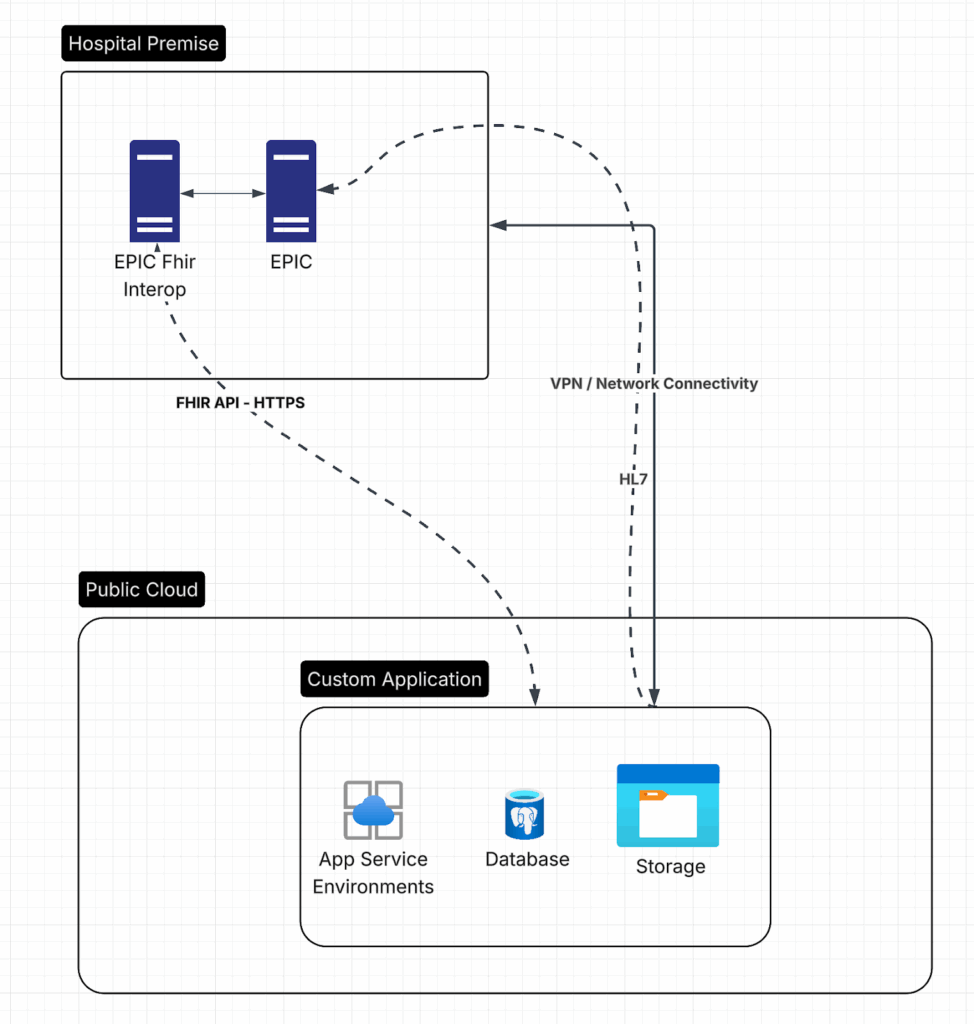
- HL7 is a PIPE delimited file with a header and multiple lines. There are many specific monikers that are used to communicate special messages to the EHR. We will not cover HL7 in detail in this blog but you can see example HL7 payloads here and you should be able to get the idea: https://docs.enterprisehealth.com/functions/system-administration/interfaces/sample-hl7-messages/
- There are two development EPIC platforms you can build apps on that customers can use. From the hospitals point of view the apps look identical but from the developers standpoint they are slightly different. The two platforms are
- EPIC on FHIR – fhir.epic.com – This is free to sign up for, no crazy magic needed, you get a free EPIC sandbox to use (every human on earth uses the same sandbox, ITS SHARED!!!). The trick is figuring out how to use the sandbox to develop against it in the first place. That is exactly what this blog will show you!
- Vendor Services – Vendor Services – This is a pay to play program you must be accepted into. It has a slightly more robust sandbox for you to play in (it’s shared) and it has access to Sherlock which is the helpdesk / dev help center for Epic. It also has a few things open.epic doesn’t. For one it has a simulator to see *kind of* what your app will look like when launched in EPIC. Fun note, EPIC won’t let developers of apps even see screenshots of EPIC so the best you will be getting is the simulator.
The apps also have ‘versioning’ in them on Vendor Services. Fun fact, You cannot change OAUTH permissions of an app after a custom is using it on open.epic. You have to create a new app every time so this is a bigger deal than it sounds like once you hear the process for a hospital to install an app. The last bit to note is that Sherlock engineers can help you setup very specific testing requirements on their sandbox through ticketing which is also not available on fhir.epic.com. Ultimately, the big difference between the two is support from epic, versioning and simulator/testing. Apps created on either will ultimately function the same.
Creating an EPIC App
The first thing you’ll want to do is go to fhir.epic.com and create an account. They are free, nothing special and you’ll need an MFA app. Your organization really matters. The first person to register something like chad@cloverhound.com … will own that domain. From then on, when anyone else signs up they’ll be met with a note saying a request has been sent to the admin. Long and short, there are organizations and multiple people can be added so they can all manage the apps.
Once you do that and are logged in to EPIC on FHIR you will see the following menu. We are going to click Build Apps -> Create to make our App.

Give it a name and for now just give it Patient.Read (R4) and Patient.Search (R4) – These are sort of the base APIs since you pretty much need a Patient FHIR ID to use the rest of the APIs.
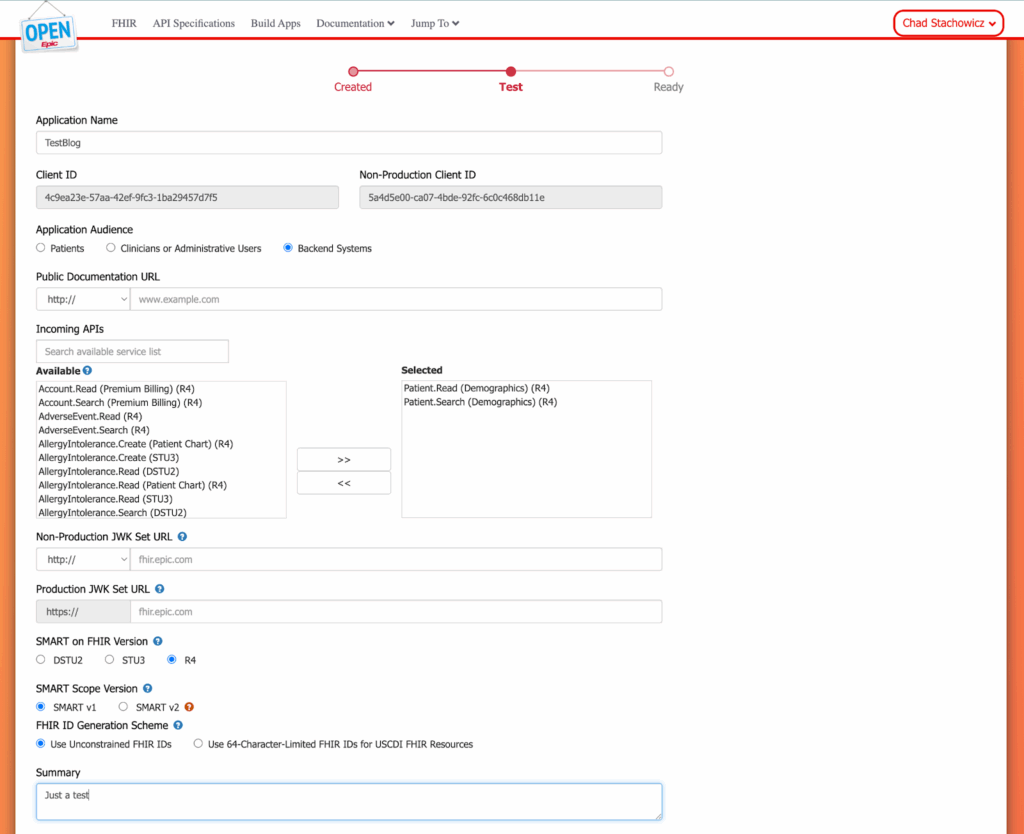
Once you have everything filled out, we need to do Save & Ready for Sandbox.
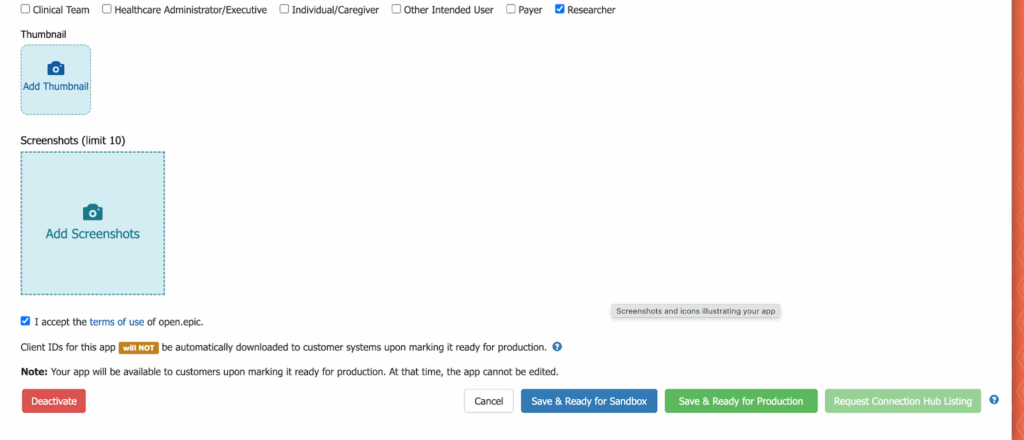
IMPORTANT NOTE: IT CAN TAKE UP TO 48 HOURS BEFORE THE APP IS IN SANDBOX OR FOR UPDATES TO OCCUR. THIS MEANS YOU CAN GET ERRORS LIKE ‘INVALID_CLIENT’ WHEN TRYING MY CODE JUST AFTER CREATION.
This will allow us to use our Non-Production Client ID above, for working with the EPIC Sandbox. For actual clients to use it… even for their sandbox, you must do ‘Save & Ready for Production’. At that point, organizations using EPIC can search your production Client ID and download the app for use, EVEN IF IT IS NOT YET ON SHOWROOM. Showroom allows them to search and download apps by name, but it is not a requirement for a hospital to use the apps that you have built. There is a lot of great information here for getting started that I might not answer: Documentation – Epic on FHIR.
There is also a list of test patients we can use on the sandbox here which will be very helpful: Documentation – Epic on FHIR.
Making your first interaction with EPIC
At a high level you’ll need your base FHIR URL, Client ID, Private Key and a FHIR ID.
Your base FHIR URL is in the doc above but for sandbox it is: https://fhir.epic.com/interconnect-fhir-oauth/ – This will be different for actual hospitals and they will give it to you.
The full URL for R4 API request is:
| Sandbox Type | FHIR Base URL |
| fhir.epic.com Sandbox – R4 | https://fhir.epic.com/interconnect-fhir-oauth/api/FHIR/R4/ |
The base for getting an oauth token is can be found here however I will give it below: https://fhir.epic.com/Documentation?docId=oauth2tutorial
But for sandbox it is: https://fhir.epic.com/interconnect-fhir-oauth/oauth2/token
Lastly your Client ID is going to be the Non-Production Client ID and the cert is the same for all sandboxes. Hard to find but it can be found here:
Here is a full Oauth tutorial if you’re trying to do it manually: https://fhir.epic.com/Documentation/Index?docId=oauth2.
Basically you need to make a JWK in order to request a token however since AI is incredible I instead asked Cursor with Opus 4.5 the following and it generated a whole app.
“I would like a barebones Javascript and HTML file that let’s me look up a patient from EPIC given a FHIR ID and display details about them. I would like a small config file where I can put my information. This is going to use a Backend OAUTH flow. Use tailwind for the front end.”
The private key is the same for all of the apps that use the sandbox:
—–BEGIN PRIVATE KEY—–
MIIEvQIBADANBgkqhkiG9w0BAQEFAASCBKcwggSjAgEAAoIBAQC8rp2r5AoeXXY7
EP7dSo/wmXXisbVy9LB8s9BHL3m/wdr3BckCjwyK2aCK9pzFnTE1phbGcOFWQL+o
7CeG9+wI80U9YppaulorACw3qdmbCyyYGHh4ZhPVJRC6G/n6XW6P02DAUgeYLa29
Ymqi/2on2xv/Np8MezJY6Od2rUuVcFCw+6D+e2D4OPzJrWSgXE+zrSqszcSftIN4
phm6mDNS+6qv+Kbff4fglh0WIR3394NQdL9MU9CfH7eSkswXwf0m6PSrwKJbDTNC
dBCvqPwHwMWDVWIZK9VDJIcMxTm4hVh4zZlQOEfS/j/x3bICibXpZA6TA17Wp0Aq
XJow/SG1AgMBAAECggEABBBEIeh43h2uT5tputN5KpfKbmTcQRwLXSKSYnNsZsu8
LM8HYzBJbsO0gN3s4BbrNY96hePlmSUdxj//f+6JblIuqZk2aCPhXOtiVTRt8sDW
fO2LUmQ4Iw8vQ4nEPbLB5ZUBu0GLI/6U6uJFKQ/YrXeH8JgfhaUPDksS3q4lGeEU
KmS3S6QAEEtF8U5PYSPPJptEcIP8W/40SXUSHeO8pzeZ7pzTqGiVenVPqV5OfEK2
oYbhLNberTunnGDYalzy8VoNMpE+LvuRmCoDif5J7Pw8Rw2pBJZ5jU+xbXzjgUiK
sFg0mM8ZJloCHtOLByza8cG9rI5ABX4fZw+b6Yn/FwKBgQD9OPi2R3aeQqyjWNw2
2W9GKlbeON1+Xke7D+ZPZfrPDoZI15wcrVjrksR5GzgjwEyRa6G3jDiBglmp8v47
DG06TTz8bhYSxp43/U1scyrxZjwvOi+HjaL8jWaz1j4QCTMXXnlQLFb0s5A91qjh
CUQH+Dk0SqKb8s4neioWr77zhwKBgQC+wGuEsubymXh53MZK+b5UHxcAj/A8lgZ3
XxC5mMKViAkMrjw9/MhPP3MlaeZWc/tEBpB7q515O8DEaHMzWZhe92gF/Fn8BROd
UtNAGOzv9hakyrKkk7dHD8GYvamCu7/JRTB8lnyHjKyKJN5A/PggKIgzhTHqgcIL
X0iOQ4mH4wKBgEGbhTUVBvKyK7CW0VeUtnPjfGZPLXQUUVlyISXpMjZ7eOdelaAI
ecVvXWBTYRRCOpRi4p9/wRQtBbY2sw/xhEtav7ZXf3iV5WB0TJ8Qp8urxWQnGzFv
zQ7KRBXMKIBXIdmoLJ5NHqp/65taBp9nmyzFb2zQ+ZiWLDumN0lxd3P5AoGAa3w/
2bF5o6BJG9oEvoDF997g9kclZu5ezGr8IKjslJfoCYYwmflT4hvtxVpMGdEW9/j+
90D35jV+ZO46Y+gLjQ+6RQ0yo2k06USflxG0iW7QyaESUtyNvPQq8eeFmg4zfrWH
Id0mZLcnDlzCBDrHkk9kmCtouizN69yQJOH3oGMCgYEA1qYcUrxcTj8ozXsgObpK
yGkymAVxJEK6NmksvTRQz5J7DdlEzsCSrcMOMGEe3Km2CZD4JI/Xuj7N0XS49UhI
1grrxM6LHfYMJ9vkzYKauTtXngUa4E6IftdbZNNpWZf7LDD518ue4lDquaXhsuuD
in+6DsO20Z3kC/QosKCQIBA=
—–END PRIVATE KEY—–
You can just copy and paste this into private_key.pem although I’ve also included it in the repo. It’s somewhere in EPICs docs but I couldn’t find it, which is pretty typical. The docs are a spiderweb.
All the code for getting a token and looking up a patient is here: https://github.com/chadstachowicz/epic_intro/blob/main/server.js
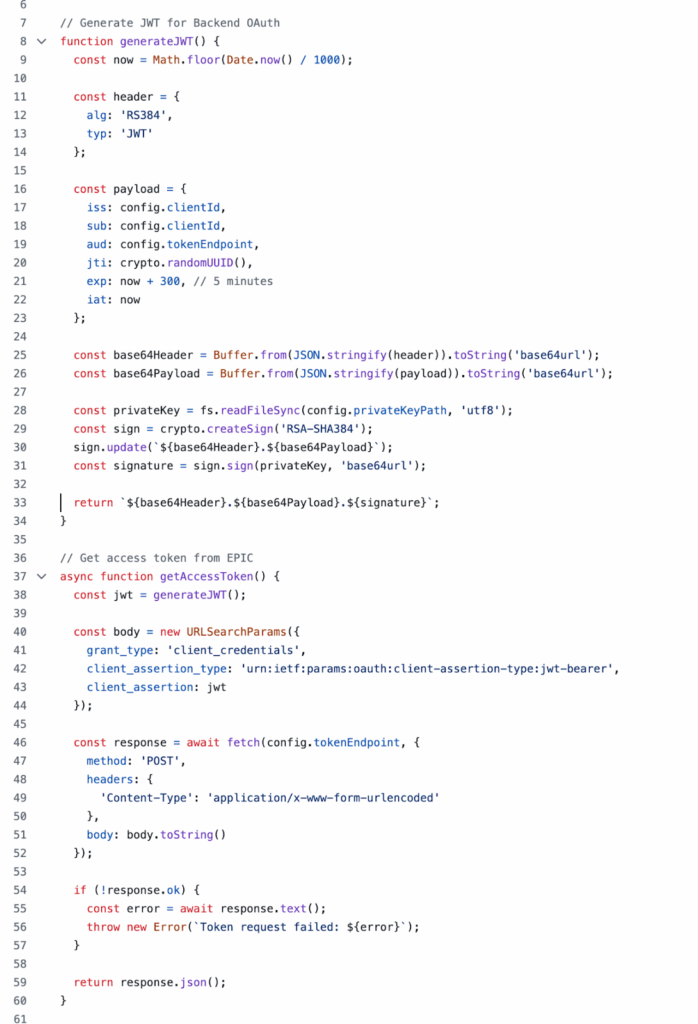
To run the app make sure you have node.js installed on version 22 or higher.
In your terminal:
cstachowicz@Chads-Mac-Studio-10 epic_intro % git clone https://github.com/chadstachowicz/epic_intro.git
cstachowicz@Chads-Mac-Studio-10 epic_intro % cd epic_intro
cstachowicz@Chads-Mac-Studio-10 epic_intro % node server.js
You can access the app at http://localhost:3000/ once it is running.
You’ll see the interface below and give it a test with a test Patient from the list earlier:
erXuFYUfucBZaryVksYEcMg3
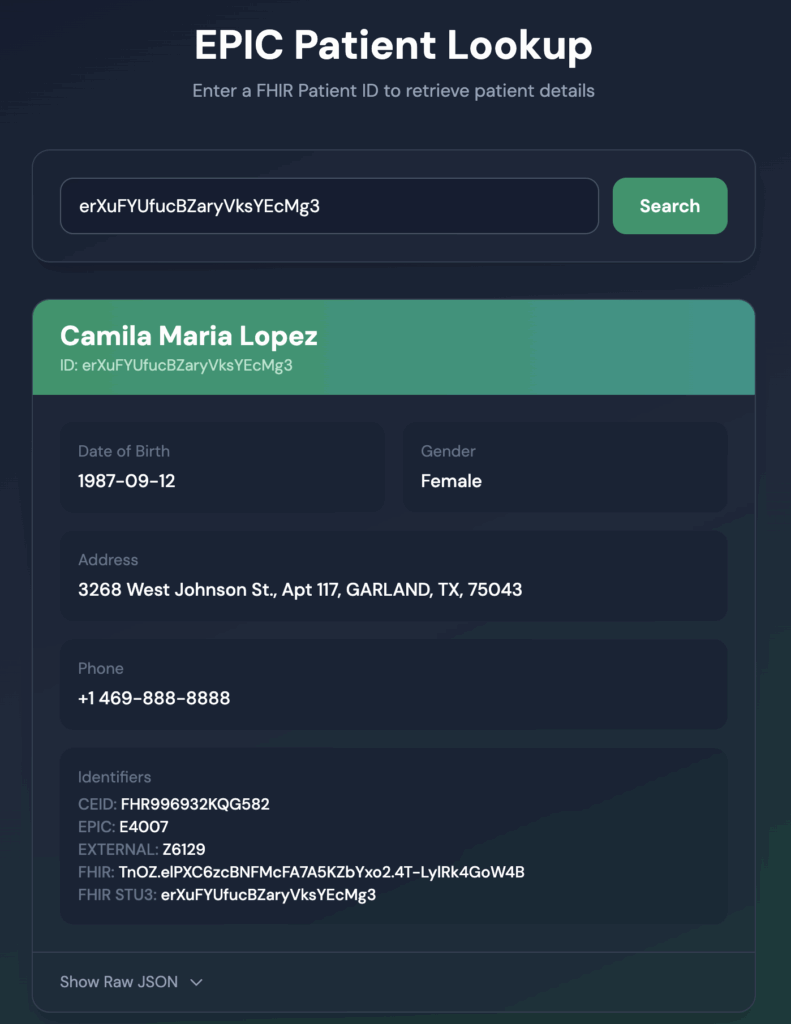
This should help you get going with EPIC and EHR Integration. Enjoy!
-Chad